Why Thread devices keep dropping off
A guide for HomeKit and Matter homes
A Thread accessory that keeps going unresponsive is usually not broken. Most of the time it is on a mesh with too few devices to relay through, on a second Thread network you did not know you had, or getting interference from your own Wi-Fi, which uses the same radio band. The Home app reports all three the same way: No Response.
What Thread is doing when it works
Thread is a low-power wireless mesh. Instead of every accessory talking straight back to a hub, mains-powered accessories relay for each other, so a sensor in the garage can reach the rest of the house through a plug in the hallway. A border router, which in most homes is a HomePod or an Apple TV, connects that mesh to your normal network so the Home app can reach it.
When something goes wrong, the mesh routes around it on its own. It can only do that if there is another device to route through.
Every Thread device is either a router or an end device
- Routers are mains-powered, always listening, and relay messages for other devices.
- End devices are usually battery-powered. They sleep most of the time, relay nothing for anyone, and attach to a single router as their parent.
Mains-powered accessories are generally eligible to become routers, and the network promotes them automatically as it needs more. Battery accessories never relay, no matter how many of them you have.
That leads to the most common bad setup: a home with one border router and a dozen battery sensors has no mesh at all. It has a dozen devices all trying to reach one radio directly, and the ones furthest away drop.
You may have more than one Thread network
A border router joins a specific Thread network, and two border routers only extend the same mesh if they share that network's credentials. Apple's border routers share credentials with each other. Some other ecosystems now share credentials across brands too, through a Matter feature built for this, but support is inconsistent, and an accessory ends up on whichever network it was commissioned into.
So a home with a HomePod and a smart speaker from another brand can be running two Thread networks side by side. They do not relay for each other. Six Thread accessories that look like one healthy mesh can be a group of four and a group of two, each too small to be reliable.
This is the most common cause of a Thread setup that looks fine but behaves badly. It is also hard to spot: nothing in the Home app tells you which network an individual accessory joined.
What causes dropouts
- Nothing to relay through. Too few mains-powered accessories, so battery devices at the edges of the house have no path back. The fix is a mains-powered Thread accessory, a smart plug works, placed between the border router and the devices that drop.
- A split mesh. Two or more Thread networks dividing your accessories into groups too small to help each other. The fix is to commission new accessories through the ecosystem you already use, so they land on the network your other devices are on.
- A router with no fallback. Several devices depending on one relay, with no second path. Thread heals around a failure only when another route exists, so the fix is a second mains-powered accessory near the first.
- Interference. Thread shares the 2.4 GHz band with Wi-Fi, Zigbee, and Bluetooth. The giveaway is a device whose signal strength reads fine while its messages still do not get through. Moving the border router a few feet from your Wi-Fi router often clears it.
- A device that keeps restarting. Every restart means rejoining the mesh, so the accessory disappears for seconds or minutes at a time and comes back looking healthy. Check its power source and firmware; if both are fine, the device itself is the problem.
Rebooting the hub does not fix any of these; at best it hides one for a while.
What the Home app can and cannot show
The closest thing the Home app offers is the Home Hubs & Bridges list in your home's settings, and it is easy to read that as your Thread setup. It is not. Home hub and border router are different roles: an original HomePod can be your home hub without having a Thread radio at all, and the list says nothing about Thread networks either way. Newer iPhones can name the Thread networks they have credentials for, buried in Settings › General › About › Thread Networks, which can reveal that a second network exists, but not which devices are on it.
Beyond that, nothing: not which accessories became routers, which router a battery device attached to, each connection's signal strength, how often anything has had to reconnect, or the mesh as a whole. Home is built to control accessories, not to diagnose the network underneath them. So when an accessory has a problem, you get the same two words, No Response, whichever of the five causes is behind it, and the usual next step is guessing.
Seeing the mesh
HomeMapper scans your home and maps the Thread mesh, on iPhone, iPad, and Mac.
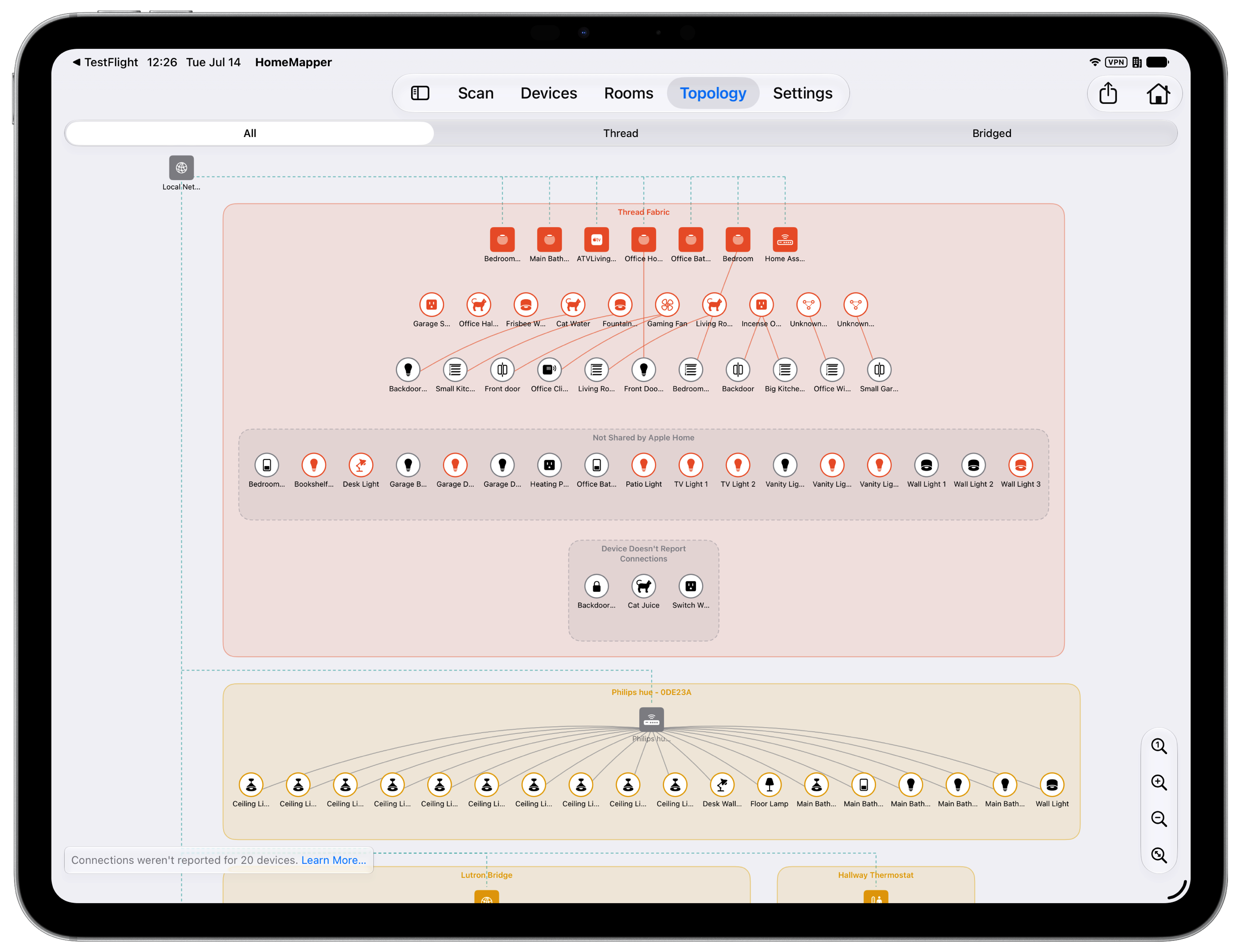
The Topology map draws each Thread network in your home as its own group, with every border router and the accessories underneath it. It only draws connections it has measured, so nothing on the map is a guess. Tap a connection to see its signal strength and how many times that device has had to reconnect. If you have two Thread networks, you see two networks.
Health turns that into a ranked list of what needs attention, worst first. Its checks cover the same five causes above: each row says which one it found, names the accessories involved, and gives you one sentence on what to do. Most homes get "Everything looks healthy," which is worth knowing too.
What it cannot show you
Some of the mesh cannot be read from an iPhone, and HomeMapper says so rather than filling in the gap with a guess:
- Accessories set up with an Apple Home code report their Thread role, but Apple does not expose what they are connected to. They appear on the map without their connections.
- Some Matter over Thread accessories never publish a neighbor list, because that part of the specification is optional.
- A Home Assistant border router appears with its own Thread network, but the accessories behind it cannot be read yet. Support for reading them is coming in autumn 2026.
More detail on those cases is in the FAQ, under why some Thread devices cannot be placed on the map and what Health checks.
Getting started
HomeMapper is free to download. The Topology map and Health are part of Pro, which includes a 7-day free trial, and is available as a $19.99 annual subscription or a one-time Lifetime Access purchase. Full details are on the pricing section of the home page.